Copies and moves one or more pipe network objects, existing pipe network objects are overwritten when pasted
Button:
Command name: SmartStamp
With SmartStamp you can copy one or more pipe network objects and paste them to another position in the drawing; existing pipe network objects are overwritten when they are pasted. It is not possible to move drawing objects such as storey lines or texts with SmartStamp.
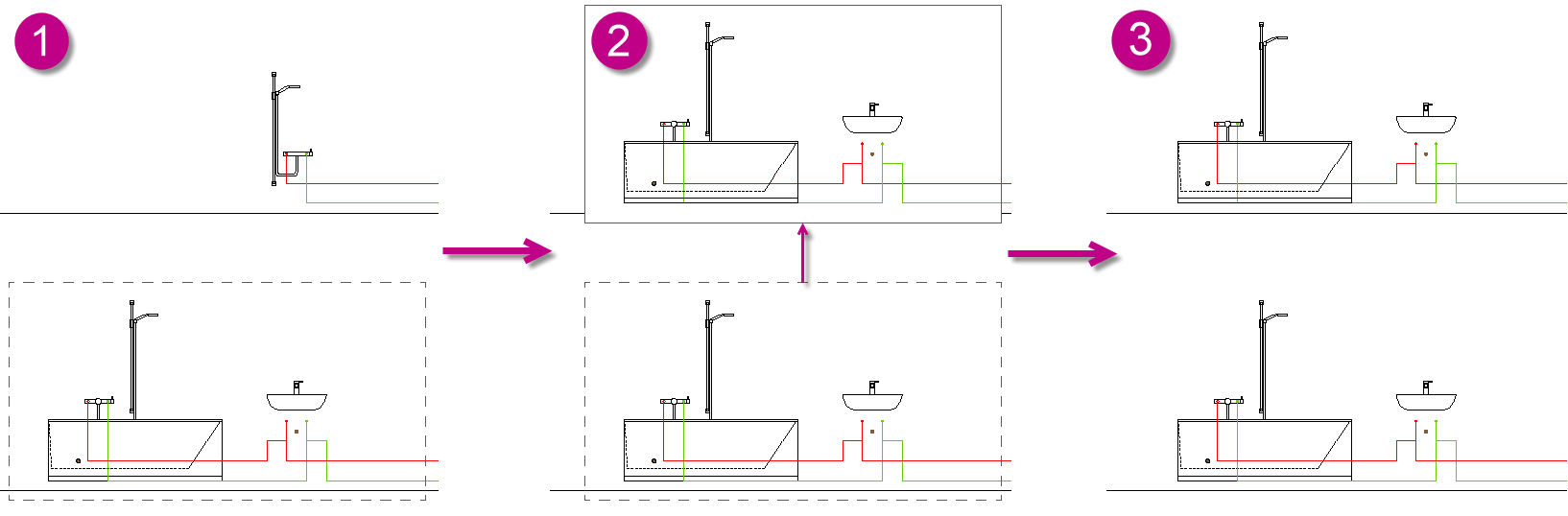
Select one or more pipe network objects that you want to copy by dragging a frame (1) or selecting the objects individually. If you select the objects individually, confirm your selection with the Enter key.
Note:
All pipe network objects within the selection frame are copied. Pipes are cut at the intersection with the frame and also copied.
Note:
The data of sections that are cut during copying are not copied.
Select the base point for moving.
Use the mouse to drag the object to the desired position in the drawing (2).
Confirm the insertion with a mouse click (3).
Note:
The object is still attached to the mouse pointer and can be inserted again.
Insert the object again or end the command with ESC or the right mouse button.
Figure 1. SmartStampYou can find more information on our YouTube channel.