
Drinking water heater
The Drinking Water Heater dialogue box displays the settings for the drinking water heater or the cold water cooler.
The dialogue box appears when you double-click the Drinking Water Heater or Cold Water Cooler icon in the Pipe Network Simulation window, or by clicking the TWE or KWK button in the Dashboard window.
Note:
If you open this dialogue box after carrying out thermal disinfection, the fields will be read-only.
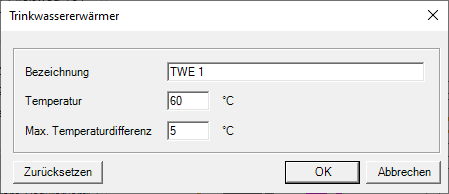
- Change the name of the drinking water heater or cold water cooler.
- Change the temperature of the domestic hot water heater or cold water cooler.
- Change the maximum temperature difference in the circulation pipe in K.