
Texts/Lines
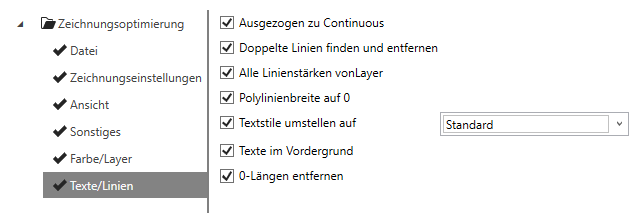
Drawn to Continuous
Switches the drawn line type to continuous line type.
Note:
The drawn line type can lead to various problems and crashes of the CAD system.
Find and remove duplicate lines
If two lines lie directly on top of each other, the shorter of the two lines is removed.
All line thicknesses on vonLayer
Sets the line thickness to vonLayer.
Polyline width to 0
Sets the polyline width to 0.
Set text styles to
Sets all text styles to the text style selected in the drop-down menu.
Note:
TrueType fonts can significantly reduce performance in the CAD environment.
Text in foreground
Changes the display order of all texts so that they appear before other elements and are easy to read.
Remove 0-lengths
Deletes lines and polyline segments that are so short that they are only displayed as dots in the drawing.