
Colour/Layer
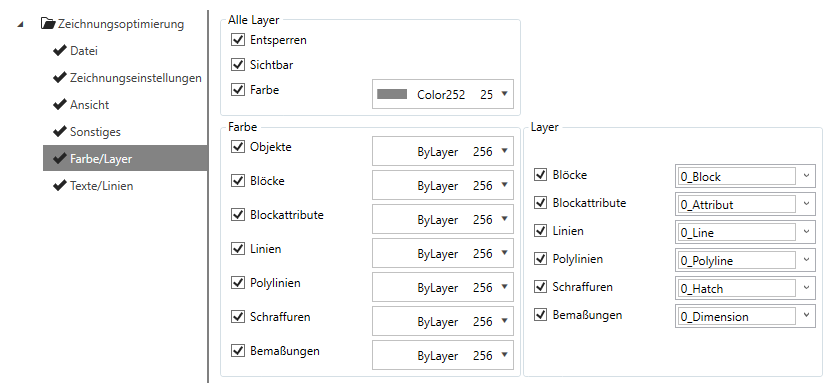
All layers
Make settings here that are to be applied to all layers.
-
Unlock
Unlocks all layers to enable editing.
-
Visible
Switches all layers to visible.
-
Colour
Assigns the set colour to all layers.
Colour
Assign the listed elements their own colour.
-
Objects
-
Blocks
-
Block attributes
-
Lines
-
Polylines
-
Hatchings
-
Dimensions
Note:
The colour assignment also applies to elements that are defined in blocks.
Tip:
To ensure that the layer colours have an influence on the elements, Dendrit recommends STUDIO selecting the colours ofBlock orLayer.
Layer
Assign a layer to the listed elements.
-
Blocks
-
Block attributes
-
Lines
-
Polylines
-
Hatchings
-
Dimensions
Tip:
Create your own layers by entering a new layer name in the drop-down menu. The new layer is created when the rule is executed in the drawing.