
Configuration selection dialogue
In the configuration selection dialogue, you can select and execute an existing configuration or create, rename, delete, import, export and edit configurations.
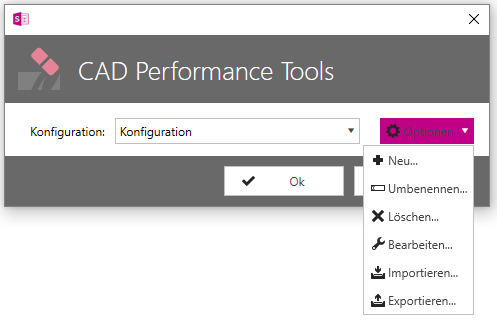
To execute an existing configuration, select it from the drop-down menu and click OK.
Other options in the dialogue are
-
New: Create a new configuration.
Click on New. Enter the name of the new configuration and confirm with OK.
-
Rename: Rename a configuration.
Select a configuration and click on Rename. Enter the new name of the configuration and confirm with OK.
-
Delete: Delete a configuration.
Select the configuration you want to delete and click Delete.
-
Import: Import a configuration by opening a .dcp file.
Click on Import. Select the .dcp file in Windows Explorer and click Open.
-
Export. Export a configuration as a .dcp file.
Click on Export. Select the storage location in Windows Explorer and click on Save.
-
Edit: Edit the rules that a configuration should contain.
Select the configuration you want to edit and click Edit. Make the changes to the configuration.