
Measurement points (circulation simulation)
The Measurement Points (Simulation) window displays an overview of the measurement fittings included in the circulation circuit and the values to be set for them. The bidirectional link with the drawing and that the currently selected measuring fitting is displayed simultaneously in the drawing and in the table.
The Measurement Points (Simulation) window consists of a component filter and three columns containing details of the measuring fittings.
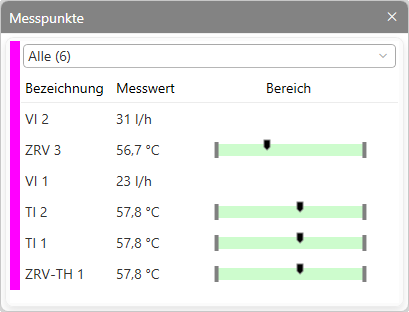
- The ‘Designation’ column displays the stored short designations (prefixes) from the design options.
- The ‘Measurement Values’ column displays the resulting temperatures or the circulation flow rates.
- In the ‘Range’ column, for temperature measuring fittings, the set value range is displayed, including the relative position of the value to be set.Tip:To sort individual columns, click on the column headers in the table to sort the entries in the respective column in ascending or descending order.