Grips windows
Button: 
Command name: GripWindow
-
Expand the U-Value drop-down menu in the command options and select a window type.
-
Grip the two outer shell dimensions of each window.
Note: The tapped points must be inside a wall. The window is automatically aligned.
Note: Windows are always deduction surfaces. Set the corresponding U-value.
Note: The window height, if this has not been defined via the U-value, and the sill height are specified in the dialogue window.
-
Pick up the width of the window with two mouse clicks in the floor plan.
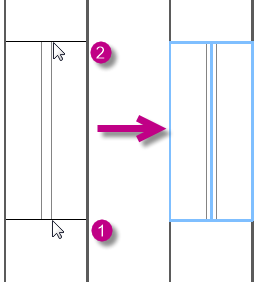
Note: Select the snap points on the inner or outer wall or in the centre of the drawn window component.
-
The Edit component dialogue is displayed, check the details and confirm with OK.
-
The previously selected U-value is listed under Designation.
-
If you have selected the wrong window component, you can adjust it via Designation.
-
Expand the Designation drop-down menu to display all windows of the selected window type created in the U-value catalogue.
-
The width of the window is automatically transferred from the drawing via the two tapped points.
-
You can adjust the window and sill height.
Note: If a fixed width and height have already been specified in the U-value created for the window, it is not possible to edit the Width and Height fields in the Edit component dialogue. You can make changes in the heat load calculation under .
The created window is displayed in blue line colour in the floor plan. The command Pick up window is still active and can be executed several times in succession. The window and sill heights entered are used as a suggestion for the following windows.
-
Now pick up all windows of the corresponding type in the floor plan one after the other.
-
End the command with ESC or the right mouse button.
Changes to the windows can be made by double-clicking on the window in the floor plan drawing. This opens the Edit component dialogue.

