Create floors

Create floors

Button:

Command name: CreateFloors

You can use CreateFloors to create floors or ceilings.

  1. Select the room symbols and/or the floor frames for which you want to create the components.
    Tip:

    On the top floor, it is advantageous to only create the floor. The corresponding roof shape is usually picked up afterwards.

  2. Confirm your selection with the Enter key.
    The floor slab is shaded brown in the drawing, the floors are shaded orange. No floor is created for rooms that extend over several storeys (e.g. stairwell) and whose room numbers were previously edited accordingly.
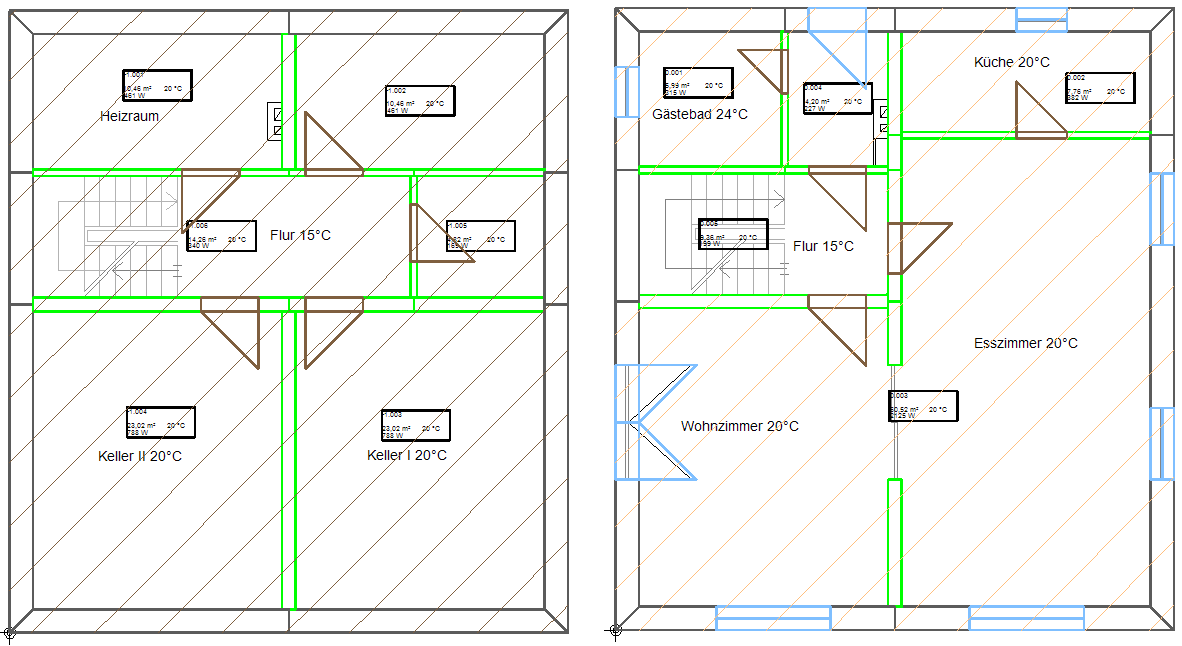
  3. You can make changes to the components at any time. Right-click on the relevant component and select Edit floor slab or Edit floor or double-click on the relevant component.

    The Edit component dialogue opens.

    • You can select a component type in the Type drop-down menu.

    • In the Name drop-down menu, you can adjust the name of the component with the corresponding U-value from the heat load calculation.

  4. Click on OK.
You can find further information on our YouTube channel.

You can access the video here