
Plot wizard: Select paper
Specify the settings for the paper and the PDF plot.
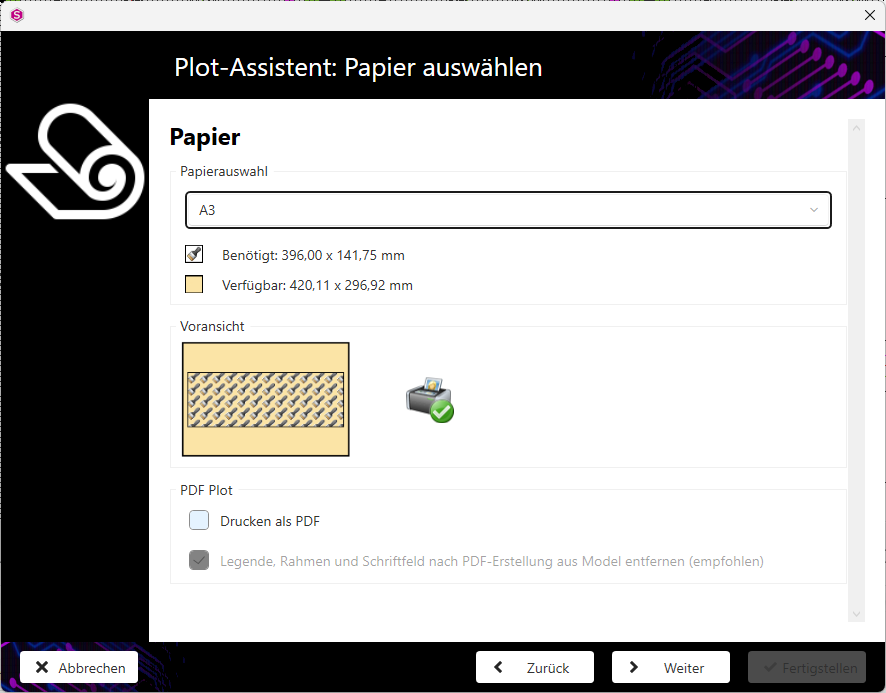
- Select the desired paper format from the Paper selection drop-down menu.
-
Activate the Required or Available checkboxes.
Attention:If the required space is greater than the available space on the print medium, the print is incomplete if the Required option is activated.Tip:Check your settings in the preview.
-
>Tick the Print as PDF checkbox if you want to print to a PDF file.
Note:If your default printer is a PDF printer, this option is already activated.
- Activate the Remove legend, frame and title block from model after PDF creation (recommended) checkbox if the activated settings from the Plot wizard: Select format dialogue(Select format) are to be removed from the model after printing.
- Click on the Next button to go to the next step of the plot wizard.