
Pipe definitions (Drinking water wizard options)
The selection of pipe definitions enables the quick assignment of different pipe sequences for each section type and the definition of the pre-wall system.
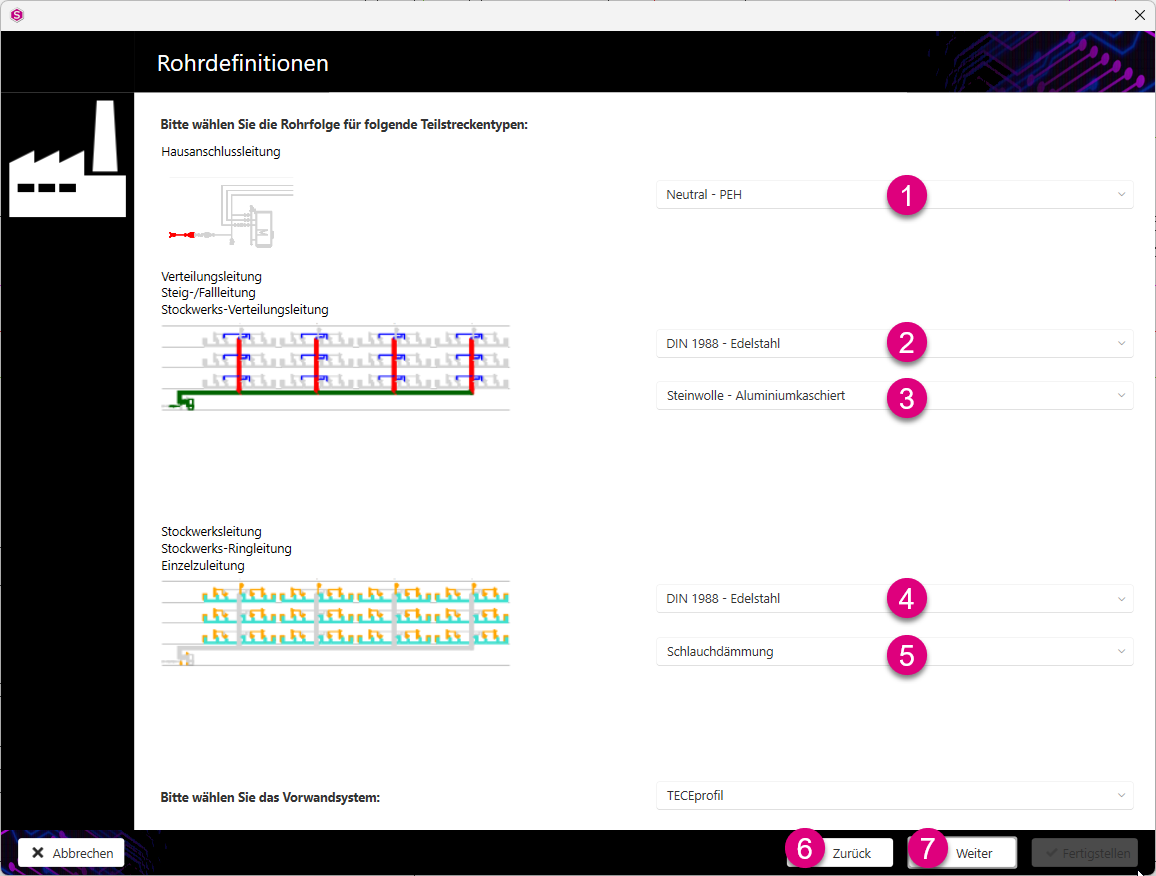
House connection pipe
- Select the pipe material for the house connection from the drop-down menu.
Distribution pipe
- Select the pipe material for the riser/downpipe and floor distribution pipe from the drop-down menu.
- Select the insulation material for the riser/downpipe and floor distribution pipe from the drop-down menu.
Storey pipe
- From the drop-down menu, select the pipe materials for the floor ring pipe and individual supply pipe.
- Select the insulation material for the storey ring main and individual supply pipe from the drop-down menu.
Pre-wall system
- Select the pre-wall system from the drop-down menu.
- Click on the Back button to revise the settings you made previously.
- Click on the Next button to go to the next step of the design definitions.
Note:
If you have previously defined individual sections in the section properties (see also Edit and set value), these definitions remain in place.
You can find more information on our YouTube channel.
