
View
The View area provides functions for organising the view in the material editor. The mass display is updated immediately after selecting the desired option.
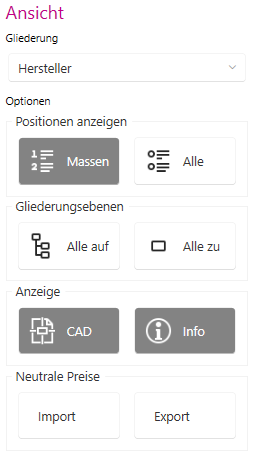
- Outline area:
The Manufacturer outline option is displayed in the Outlinedrop-down menu.
- Show options items area:
The Masses button displays all masses from your project. The All button displays all masses from CALHYDRA.
- Options - Outline levels area:
Use the All to button to expand all levels in the display area. The Close all button closes all levels in the display area. You will only see the main level.
- Options display area:
Use the CAD button to show or hide the CAD window. Use the Info button to control the display of the item description with long text.
- Neutral prices area: Use the Import button to import a price file for neutral masses into CALHYDRA.Note:The imported prices apply to all documents in the project. The edited prices are no longer available in a new project and must be imported again.
Use the Export button to save a price file for neutral masses from CALHYDRA to a desired storage location.
You can find more information on our YouTube channel.
