
Explanation of the section properties
Here you will find detailed descriptions of the individual section properties.
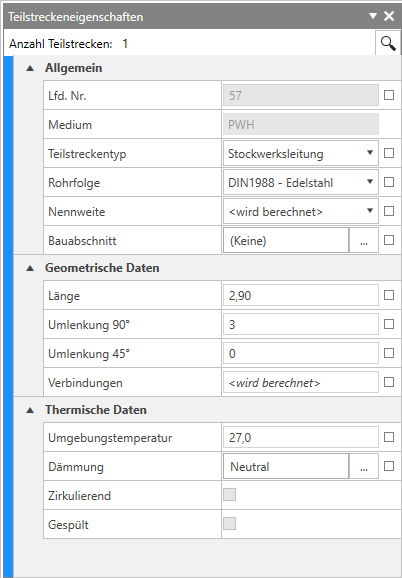
-
Section number:
The section number is a consecutive number and assigns a unique number to each section. The number is automatically incremented during the calculation, starting from the house connection. It starts consecutively with the least favourable line. This is followed by the next least favourable line.
-
Medium:
Displays the layer abbreviation of the section.
-
Section type:
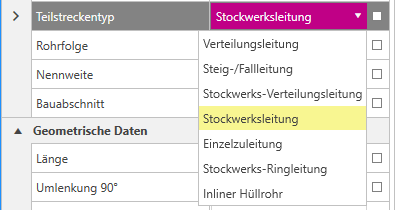
You can select your section type in the drop-down menu.
-
Pipe sequence:
The pipe sequence indicates the material of your selected sections in the drawing. The pipe sequence can be selected in the drop-down menu.
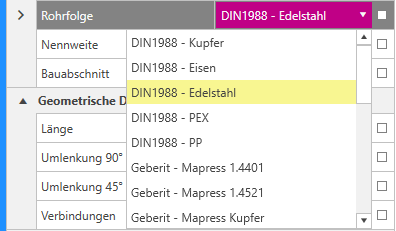 Note:You can adjust the pipe rows in the Design options dialogue.
 -
Nominal diameter:
The Specified nominal diameter indicates your specified nominal diameter.
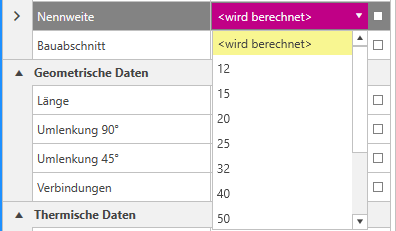
The nominal diameter is set by selecting it in the drop-down menu.
-
Construction stage:
The construction section specifies the specified construction section. With ... to open the Edit construction stages dialogue.
-
Length:
Displays the total length of the section.
-
Deflections 45°:
The number of deflections (bends and angles) in 45° is specified here. You can also enter the deflections manually and set the value.
-
Deflections 90°:
The number of deflections (bends and angles) in 90° is specified here. You can also enter the deflections manually and set the value.
-
Connections:
The number of connections is specified here. If you do not enter a value, it will be calculated. You can also enter the connections manually and set the value.
-
Ambient temperature::
Displays the ambient temperature of the section. You can also enter the ambient temperatures manually and set the value.
-
Insulation:
The insulation thickness and thermal conductivity are specified here. Click on the ... button takes you to the Select insulation dialogue.
-
Circulating:
The checkbox indicates whether the section is circulating.
-
Flushed:
The checkbox indicates whether the section is flushed.
You can find further information on our YouTube channel.
