
Discharge volume flows
The Drainage volume flows window in the wastewater section provides brief information on the volume flows in the selected section.
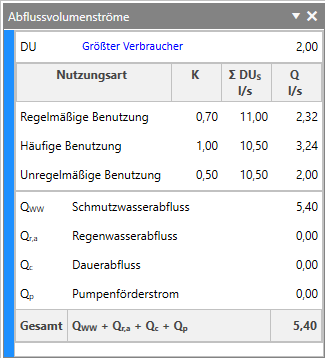
| Name of the component | Explanation of the component | Physical unit |
|---|---|---|
| DU | Indicates the connected load. Note: By clicking on Largest consumer, the drainage object with the largest connected load is marked in the drawing. |
[l/s] |
| Type of utilisation | Indicates the discharge index, the connected load and the volume flow of the individual entry for each type of utilisation. Note: When you move the mouse over the Q l/s column, detailed information on the composition of the wastewater discharge of the respective utilisation types is displayed. |
[l/s] |
| QWW | Indicates the wastewater discharge. Note: The displayed wastewater discharge already takes into account the proportion set in the design options for the flow calculation of other types of utilisation. |
[l/s] |
| Qr,a | Indicates the rainwater discharge. | [l/s] |
| Qc | Indicates the continuous discharge. | [l/s] |
| QP | Indicates the pump flow rate. | [l/s] |